How to Film Outfit Videos at Home Without a Studio
August 15, 2026
You do not need a professional studio, an expensive camera crew, or a ring light the size of a satellite dish to produce compelling fashion content. The most-watched outfit videos on TikTok, Instagram Reels, and YouTube Shorts are frequently filmed in bedrooms, hallways, and living rooms — with nothing more than a smartphone and a clear understanding of a few fundamental principles. Whether you are a small fashion brand, an independent creator, or an e-commerce seller looking to drive more sales, learning how to film outfit videos at home correctly will save you thousands in production costs while still delivering content that converts.
- Natural light from a window is the most accessible and flattering light source for a DIY fashion video setup.
- A clean, uncluttered background keeps focus on the outfit and reads as professional even in a domestic space.
- Smartphone cameras in 2025 and 2026 are fully capable of producing broadcast-quality fashion footage when set up correctly.
- Stable footage is non-negotiable — a basic tripod eliminates the amateur look instantly.
- AI tools like Outfit Video can transform static outfit photos into polished short-form videos, reducing the need for live filming entirely.
- Filming in vertical format from the start saves significant editing time for TikTok, Reels, and Shorts.
Choose Your Light Source Before Anything Else
Lighting is the single variable that separates amateur home footage from content that looks intentional. The good news is that the best light source for a home studio outfit video is free. Position yourself or your subject facing a large window so that the natural light falls directly onto the front of the outfit. Side lighting creates shadows that flatten texture and obscure detail — the opposite of what you want when showcasing fabric, pattern, or fit.
Shoot during the hours when daylight is bright but not harsh — typically mid-morning or mid-afternoon depending on your window orientation. Avoid shooting directly in front of a window with the camera, as this creates a silhouette effect. If natural light is inconsistent due to weather or your shooting schedule, a single softbox or LED panel placed at a 45-degree angle in front of the subject replicates window light reliably. For a deeper breakdown of how different setups affect garments on camera, the guide on fashion video lighting setups that make clothes pop covers five specific configurations worth studying.
Build a Clean Background in Any Room
A cluttered background signals low production value and pulls the viewer’s eye away from the outfit. You do not need a purpose-built studio to solve this. The most practical approaches for a DIY fashion video background at home include:
- A plain wall — white, cream, or a muted tone that complements your brand palette. Move furniture out of frame rather than trying to shoot around it.
- A seamless paper roll — available from photography suppliers for under fifty dollars, these clip to a curtain rod or bookshelf and create the classic studio sweep on demand.
- A curated lifestyle corner — a carefully arranged section of your home (a bookshelf, a bed with neutral linen, a doorway) that creates context without distraction. This works particularly well for lifestyle-oriented brands.
- Outdoor spaces — a plain brick wall, a garden, or a quiet street adds visual interest without requiring any setup. Check the light direction before committing to a spot.
Consistency matters if you are producing regular content. Choosing one or two home locations and returning to them creates a recognisable visual identity across your channel without additional effort.
Camera Settings and Framing for Outfit Footage
Modern smartphones — particularly flagship models — shoot in formats and resolutions that exceed the requirements of every major social platform. Set your camera to the highest available resolution and, critically, film in vertical format (9:16) from the outset. Cropping horizontal footage to vertical afterwards results in significant quality loss and awkward framing. For a full reference on platform-specific dimensions, the vertical video specs guide for every social platform in 2026 is a practical checklist to keep bookmarked.
For framing outfit content specifically:
- Frame from the crown of the head to just below the ankles to show the complete look.
- Use a second shot framed from the waist up to highlight the top half, accessories, or detail work.
- Keep the subject centred horizontally, particularly for outfit transition videos, where symmetry makes cuts feel cleaner.
- Enable your camera’s gridlines to maintain straight horizons and avoid tilted footage.
Exposure matters as much as resolution. Tap on the subject on your phone screen to lock focus and exposure to the outfit rather than the background. If your phone offers manual controls, aim for a slightly brighter exposure than you think you need — it is easier to pull back brightness in editing than to recover dark, noisy footage.
Stabilisation and Camera Movement
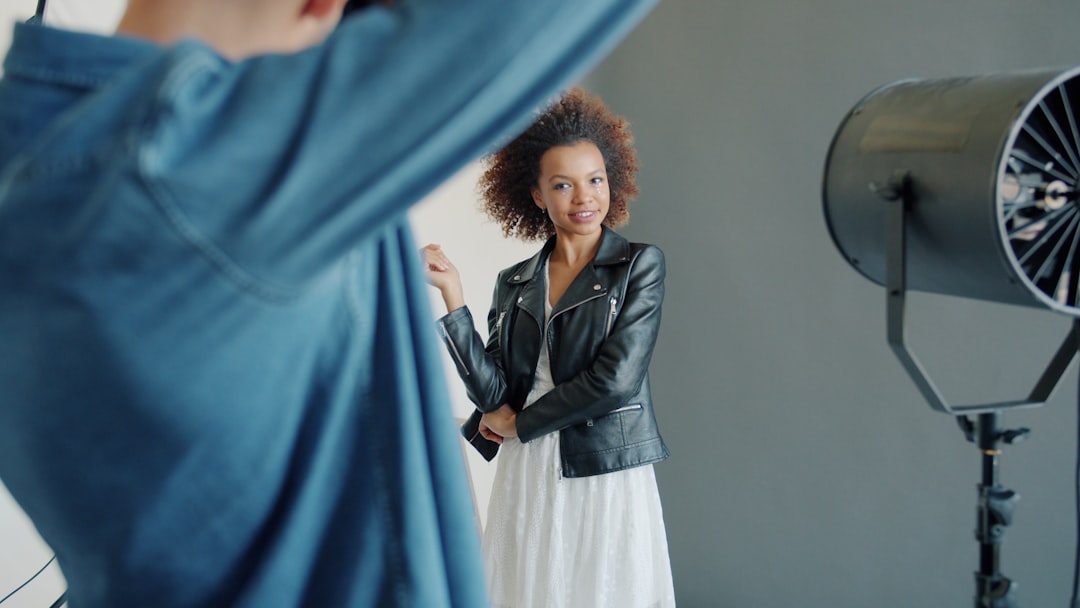
Shaky footage reads as unprofessional regardless of how well-lit or styled the content is. A basic smartphone tripod — available for under twenty dollars — eliminates this problem entirely for static shots. For moving shots such as slow 360-degree walks or follow-along footage, a smartphone gimbal provides electronic stabilisation that keeps the camera smooth as the subject moves.
The most effective camera movements for home studio outfit videos are simple ones. A slow pan from shoes to face, a static wide shot followed by a static close-up on a detail, or a straightforward walk towards the camera — these read as intentional and give editors clean footage to work with. Complicated handheld movements rarely add value and frequently introduce shake that undermines the final result.
If you are filming solo without a photographer or videographer, use your tripod with a Bluetooth remote or your phone’s self-timer to trigger recording. Most editing software can trim the awkward start and end of clips automatically.
Using AI Tools to Reduce Filming Time Altogether
Not every piece of fashion content requires live video footage. AI outfit video generators have matured to the point where a single high-quality photograph of an outfit can be transformed into a dynamic, motion-rich short-form video in minutes. This is particularly valuable for brands with existing product photography libraries, independent sellers on platforms like Etsy or Depop, and creators who want to maintain posting frequency without scheduling daily shoots.
The workflow is straightforward: upload a still image of the outfit, select a format and style, and the AI generates motion, transitions, and pacing suitable for TikTok, Reels, or Shorts. For brands curious about how this fits into a wider content strategy, the post on how small fashion brands are using AI video to compete provides concrete examples of the approach in action. AI-generated content works especially well alongside — rather than instead of — live footage, giving you a scalable way to maintain volume while reserving your filming time for hero content.
Editing and Finishing Your Home Footage
Raw footage from a home shoot almost always needs colour correction, trimming, and audio treatment before publishing. Free and low-cost mobile editing applications — CapCut, InShot, and DaVinci Resolve for desktop — handle all three competently. The priorities at the editing stage are:
- Colour grading — lift shadows slightly, reduce highlights if the footage is overexposed, and adjust white balance so that whites in the garment appear true rather than yellow or blue.
- Trimming — cut all dead air at the start and end of clips. The first frame should contain action or visual interest.
- Music and audio — choose a track that fits platform licensing requirements. On-screen text captions increase watch time and accessibility; see fashion video captions and subtitles best practices for guidance on placement and timing.
- Export settings — export at the native resolution of your footage, typically 1080p or 4K at 30fps or 60fps depending on platform recommendation.
Consistency in editing style — similar colour grading, the same font for text overlays, and a recognisable pacing — builds brand recognition across your content without requiring expensive templates or designers.
FAQ
What is the best camera for filming outfit videos at home?
A current-generation smartphone is sufficient for the vast majority of home outfit video content. Flagship models from Apple, Samsung, and Google shoot in 4K with optical stabilisation and produce footage that meets every major social platform’s quality requirements. A dedicated mirrorless camera offers more control over depth of field and low-light performance, but it is not necessary to start producing professional-looking content at home.
How do I get good lighting for a DIY fashion video without buying equipment?
Position yourself facing a large window during daylight hours. The window acts as a natural softbox, wrapping light around the subject and minimising harsh shadows. Avoid having the window behind you or behind the camera, as both create contrast problems. If the light is too bright and creating blown-out highlights on light-coloured garments, hang a white sheet or net curtain over the window to diffuse it.
Can I film a home studio outfit video on my own without a photographer?
Yes. Mount your smartphone on a tripod at the correct height and distance, set up your background and lighting, then use a Bluetooth remote or the phone’s self-timer to start recording. Review the footage between takes and adjust framing or exposure as needed. Alternatively, use an AI video tool to convert existing outfit photographs into video content, which eliminates the need for live filming entirely.
What background should I use for outfit videos at home?
A plain white or neutral-toned wall is the most versatile and cleanest option. If your walls are textured or have a colour that clashes with your outfits, hang a large piece of plain fabric or purchase an inexpensive seamless paper background roll. A lifestyle setting — such as a neatly arranged bedroom corner or a minimal kitchen backdrop — works well for brands that want a warmer, more editorial feel rather than a clinical studio look.
Do I need to film outfit videos at all if I already have product photos?
Not necessarily. AI outfit video generators can convert existing product photographs into short-form video content suitable for TikTok, Instagram Reels, YouTube Shorts, and Pinterest. This approach is particularly efficient for brands with large product catalogues or for sellers who cannot arrange regular video shoots. Live footage and AI-generated video work well together as part of a mixed content strategy.
Ready to turn your outfit photos into scroll-stopping videos? Try Outfit Video free and create your first AI fashion video in minutes.
Ready to turn your outfit photos into scroll-stopping videos? Try Outfit Video free and create your first AI fashion video in minutes.